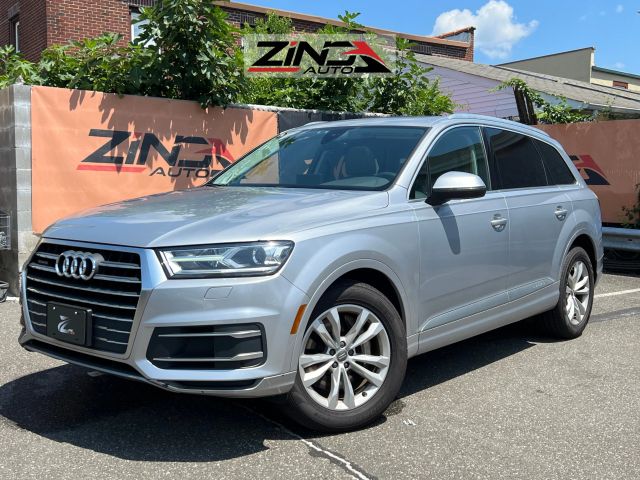
The headlight switch is a rotary knob style, located on the left side of the dashboard, near the door below the steering wheel. Simply turn the knob to the AUTO mode. The left circle indicates turning off the headlights, the right light symbol is for turning on the parking lights, turning to the right activates the low beam, and in low beam mode, pushing the left turn signal lever outward turns on the high beam. The Q7 is equipped with adaptive headlights that automatically adjust the deflection of the headlights based on driving speed, steering angle, etc., to illuminate the turning area in advance.

I've been driving an Q7 for two or three years. The dynamic cornering light is essentially the function where the headlights follow the steering wheel's movement. This feature is automatically enabled by default and doesn't require any special operation. Just set the light control lever to AUTO mode, and when you turn the steering wheel at night, the lights will automatically illuminate the inside of the curve. It can also be triggered if you manually turn on the low beams. You can configure it in the MMI central control screen: press the CAR button to enter the vehicle menu, select External Lighting, and check the Dynamic Cornering Light option. The effect is most noticeable when the speed exceeds 15 km/h, and the side assist lights will also automatically activate when reversing. If the lights don't move when turning at night, first check the settings in the central control to ensure the feature is enabled, or try restarting the car.

As a long-time Q7 owner, the dynamic cornering light feature is super practical but doesn't require manual activation. The prerequisite is having the light switch set to automatic mode (turn the knob to the headlight symbol with AUTO position), or manually turning on the low beams. When you steer, the headlights automatically adjust beam direction to assist with cornering visibility. For example, when making a left turn on mountain roads, the left light will pivot about 30 degrees left. If it doesn't seem to work, first check vehicle settings: press the menu button on the steering wheel, select Vehicle, then Exterior Lighting, and ensure the Dynamic Cornering Lights option is enabled. Sometimes it may temporarily deactivate at very low speeds or if sensors are obstructed - keep headlight covers clean during car washes. For older Q7 models with aftermarket headlight replacements, a system parameter reset might be needed to enable this feature.

Having driven several generations of Audis, the adaptive headlight settings on the Q7 are quite straightforward. After starting the car, simply turn the light switch to AUTO mode. At night, when you turn the steering wheel more than approximately 10 degrees, the headlights immediately follow the steering direction to provide supplemental lighting, all automatically. Navigate to the external lighting options in the central control screen settings and slide to activate the dynamic headlight function. In case of rainy or foggy weather, it's advisable to also turn on the cornering light function for enhanced illumination. Remember, this feature is distinct from adaptive high beam—the former manages cornering illumination while the latter automatically switches between high and low beams. Driving at 40 mph through a right-angle turn in the city best demonstrates the beam deflection effect. The system relies on wheel steering sensors, so inaccurate tire alignment may affect its precision.

Last year, I picked up the Q7 Sport edition and specifically researched the adaptive headlights. There's no need to manually activate them, but the light control knob must be in the auto or on position. During normal driving when turning, the motor within the headlight assembly rotates the light unit, capable of turning up to 15 degrees to illuminate the curve. If adjustment is needed, access the vehicle settings menu in the central console; under the external lighting options, there's a switch for dynamic cornering lights. Note that the feature activates only when the speed exceeds 10 km/h. Reversing and steering will trigger the cornering assist lights without moving the main headlights. If road reflections during rain make it hard to see, adding a light settings icon to the quick menu at the bottom of the central screen makes it easier to check the status anytime. This function automatically turns off when there's a light warning, so prompt inspection is recommended.

An owner with five years of experience mentioned that the Q7's dynamic turn signals are incredibly hassle-free. Simply set the light control lever to the AUTO position, and all configurations are done. At night, the lights automatically sweep toward the inside of the curve, especially noticeable on winding mountain roads. This feature also activates when manually turning on the low beams, requiring no additional steps. For fine-tuning, access the vehicle menu via the buttons on the right side of the steering wheel and enable the dynamic headlight function in the external lighting options. It's recommended to use this feature in conjunction with automatic high beams for better performance, as the beam automatically extends its range when navigating curves on highways. However, note that there's a 0.5-second delay in light response during consecutive turns, and on icy or snowy days, the weak reflection from the road might make it hard to see the beam's directional change. For models with added fog lights, selecting the all-terrain mode in the settings may be necessary to activate all steering assist functions.